I’ve been building servers since my twenties. Back in the early 2000s, before cloud as we know it today was a thing, my first setup was a pair of old Intel 1U servers in my basement. Nothing special, just enough to build and host websites and learn how services actually worked. When you do things this way, you can’t help but learn all of the components.
That instinct, to understand systems by building them, is what led me to set up a bare-metal llm-d lab on hardware I could actually afford. Most of the llm-d ecosystem runs on H100 clusters in cloud data centers. My question was simple: how can you maximize inference using the hardware you already have?
The Goal
Get a bare-minimum working example of llm-d’s disaggregated prefill/decode architecture with RDMA-based KV cache transfer between two physical nodes. Not a benchmark. Not a production deployment. Just proof that the full stack works end-to-end on used hardware you can buy on eBay.
Choosing the Hardware
The NICs: ConnectX-4 Lx
RDMA was the non-negotiable starting point. llm-d’s disaggregated architecture transfers KV cache between prefill and decode pods over the network, and RDMA is what makes that transfer fast enough to be worthwhile. Without RDMA, you’re shipping gigabytes of KV cache over TCP, and the network overhead eats any benefit from disaggregation.
I went with Mellanox ConnectX-4 Lx (MCX4111A-ACAT), single-port 25GbE SFP28 cards. They’re the sweet spot for a home lab: cheap on the secondary market (~$30-40 each), well-supported by the inbox mlx5_core driver (no OFED install needed), and they do RoCE v2 out of the box. I connected them with a direct-attach copper (DAC) cable, no switch needed for two nodes.
The GPUs
RTX 3060 (12GB, Ampere) was already in my workstation. 12GB is enough for a quantized 7B model with room for KV cache.
Tesla T4 (16GB, Turing) is the most accessible used datacenter inference GPU. 16GB VRAM, 70W TDP. Note: it’s passively cooled, so in a tower chassis you’ll need extra fans pointed at it or it will throttle.
Any sm_75+ card with enough VRAM works. A used RTX 2080 Ti would do the same job.
The Servers
Both are Supermicro dual-socket boards accumulated over years:
- endor (decode): dual AMD Opteron 6272, 92GB RAM, RTX 3060
- dagobah (prefill): dual Xeon E5-2699A v4, 220GB RAM, T4
The CPUs and RAM are irrelevant for inference. The GPU is what matters. Starting from nothing, budget ~$1000-1500 for the GPUs, NICs, and a DAC cable. The reason to own the hardware isn’t cost, it’s access. You can’t debug RDMA GID tables on a managed cloud instance. The real learning happens when things fail in ways no simulator models.
Making RDMA Work
The Easy Part
Install the ConnectX-4 cards, connect with the DAC cable, assign IPs:
endor:    10.0.0.1/24 on enp65s0np0 (mlx5_0)
dagobah: 10.0.0.2/24 on ens1np0    (mlx5_0)
Verify with ib_send_bw:
 #bytes   #iterations   BW peak[MB/sec]   BW average[MB/sec]
 65536    5000          2893.47           2893.14
23.14 Gbps, that’s 92.5% of the theoretical 25GbE line rate. Latency: 1.27 microseconds. The inbox kernel driver just works on Fedora. No OFED, no firmware flashing, no drama.
The Not-Easy Part
Getting RDMA to work inside Kubernetes pods is where it got interesting.
Problem 1: ib_umad. The RDMA device plugin (k8s-rdma-shared-dev-plugin) couldn’t discover devices because the ib_umad kernel module wasn’t loaded. No error message, just silent failure. Devices showed as 0 allocatable. Fix: modprobe ib_umad and persist via /etc/modules-load.d/.
Problem 2: hostNetwork. The device plugin gives pods access to /dev/infiniband/ devices, but not the network routing needed to actually use them. The RDMA traffic needs to flow over the host’s physical NIC, not through a CNI virtual network. Fix: hostNetwork: true on both vLLM pods, plus dnsPolicy: ClusterFirstWithHostNet so DNS still works.
Problem 3: GID table. The RDMA NIC on dagobah had no IP configured at boot. It would get assigned later by my scripts. But RoCE v2 needs an IP in the GID table to function. An empty GID table means the NIC falls back to RoCE v1, and when one side is v2 and the other is v1, the NIXL handshake fails silently. Fix: configure the IP persistently via NetworkManager so it’s there before any pods start.
Problem 4: UCX device naming. NIXL uses UCX under the hood for RDMA transport. The environment variable UCX_NET_DEVICES needs the InfiniBand device name (mlx5_0:1), not the host network device name (ens1np0). Get it wrong and UCX falls back to TCP with no warning. Thankfully, UCX lists available devices in its error output when the specified device doesn’t exist.
Every one of these issues took a fair amount of time to debug. None of them are documented in the llm-d getting-started guides, because those guides assume you’re on a cloud provider where the RDMA infrastructure is pre-configured. But every one of these issues will hit any team deploying llm-d on bare metal or on-prem.
Building the Kubernetes Layer
k3s on both nodes. Lightweight, single-binary, gets out of the way. The control plane runs on endor, and dagobah joins as an agent.
endor:    k3s server (control plane + decode workloads)
dagobah: k3s agent (prefill workloads)
NVIDIA GPU Operator exposes the GPUs. The key setting: driver.enabled=false because both nodes already have the NVIDIA driver installed at the host level (akmod-nvidia on Fedora). The operator just needs to install the container toolkit, not the driver.
One gotcha that cost me an afternoon: the upstream vLLM container image (vllm/vllm-openai) ships CUDA 12.9. My driver is 580.x which provides CUDA 13.0. On datacenter GPUs, NVIDIA’s forward-compatibility libraries handle this mismatch. On consumer GPUs like the RTX 3060, they don’t. I had to build a custom image based on nvidia/cuda:13.0.1-devel-ubuntu24.04 with vLLM installed from PyPI.
The devel base (not runtime) matters too. FlashInfer needs nvcc for JIT compilation on the T4’s sm_75 architecture. Precompiled kernels only exist for sm_80+.
The Gateway Stack
llm-d uses the Kubernetes Gateway API with an inference extension. The stack:
Client -> agentgateway (Envoy) -> ext-proc -> EPP (scheduler) -> vLLM pod
The EPP (Endpoint Picker) is the brain. It decides which pod should handle each request based on KV cache state, queue depth, and pod roles. For disaggregated P/D, it runs two scheduling passes: pick the decode pod first, then decide if a separate prefill pod is needed.
I hit one naming evolution that caused confusion: kgateway was rebranded to agentgateway between releases. The kgateway v2.2.0 image I initially deployed had the inference extension disabled by default, with an env var (KGW_ENABLE_AGENTGATEWAY) that required CRDs from a domain (agentgateway.dev) that didn’t exist yet in that release. Switching to the agentgateway chart (v1.0.0-alpha.4) fixed everything.
Disaggregated Prefill/Decode
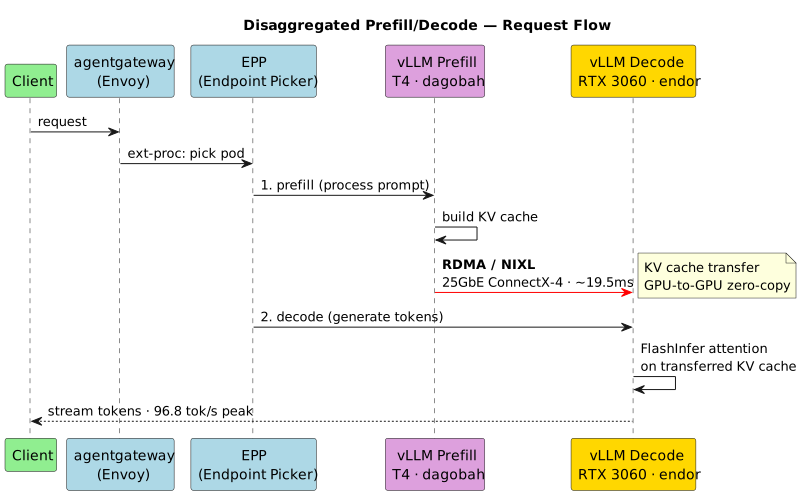
This is the payoff. The core idea: prefill (processing the input prompt) is compute-bound and benefits from a strong GPU. Decode (generating output tokens one at a time) is memory-bandwidth-bound. By splitting them across specialized pods, you can optimize each independently.
In my lab:
- T4 (dagobah) for prefill. 16GB VRAM, decent tensor core throughput for INT8. Processes the input prompt and builds the KV cache.
- RTX 3060 (endor) for decode. 12GB VRAM, 360 GB/s memory bandwidth. Generates output tokens using the transferred KV cache.
The KV cache transfer happens over RDMA via NIXL (NVIDIA’s Inference Xfer Library). After the prefill pod processes the prompt, it tells the decode pod “here are the KV cache block IDs.” The decode pod’s routing sidecar triggers a NIXL transfer, moving GPU memory from dagobah to endor over the 25GbE RDMA link.
The Attention Backend Trap
This one was subtle and took the longest to debug.
The T4 (sm_75) can’t run FlashAttention2, which requires sm_80+. The RTX 3060 (sm_86) picks FA2 by default. When each pod uses a different attention backend, they produce KV caches with different shapes, meaning different memory layouts for the key and value tensors.
NIXL transfers raw bytes. It doesn’t know or care about tensor shapes. So the transfer succeeds, but the decode pod interprets the bytes with the wrong layout, and inference produces garbage.
The fix: force --attention-backend FLASHINFER on both pods. FlashInfer supports both sm_75 and sm_86 (via JIT on the T4), producing compatible KV cache layouts.
This is the kind of issue that never appears in homogeneous cloud deployments where every GPU is the same model. Mixed GPU architectures surface it immediately.
Testing It
A chat completion through the gateway:
GATEWAY_IP=$(kubectl get gateway inference-gateway -o jsonpath='{.status.addresses[0].value}')

curl -s http://${GATEWAY_IP}/v1/chat/completions \
  -H "Content-Type: application/json" \
  -d '{
    "model": "Qwen/Qwen2.5-7B-Instruct-AWQ",
    "messages": [{"role": "user", "content": "Explain RDMA in one paragraph."}],
    "max_tokens": 100
  }' | python3 -m json.tool
Checking that the EPP is routing to the right roles:
kubectl logs -f deploy/vllm-pool-epp | grep -i "prefill\|decode"
And verifying the NIXL transfer is actually happening over RDMA:
kubectl logs deploy/vllm-decode -c vllm --tail=50 | grep "external prefix"
INFO: External prefix cache hit rate: 100.0%
Results
Model:          Qwen2.5-7B-Instruct-AWQ (awq_marlin, max-model-len=1024)
Cache hit rate: 100% external prefix cache hit rate
NIXL transfer:  avg 19.5ms, 36% of small transfers <5ms (RDMA zero-copy)
Peak decode:    96.8 tokens/sec
The numbers aren’t impressive by datacenter standards. That’s not the point. The point is that the full disaggregated P/D stack, agentgateway, EPP with PdProfileHandler, NIXL over RDMA, routing sidecar, and prefix cache scoring, all works end-to-end on two servers that cost less than a single H100.
Maximizing Older Hardware
Quantization is the great equalizer. AWQ at INT4 cuts a 7B model from 14GB to ~3.5GB. Any sm_75+ GPU with 8GB+ VRAM can serve a useful model.
Disaggregation helps small GPUs more than big ones. An H100 has 80GB for model + KV cache. An RTX 3060 has 12GB,barely enough for the model alone. By offloading prefill, the decode GPU doesn’t need to hold the full prompt’s KV cache. Disaggregation is more valuable at the margins.
CPU memory is cheap, GPU memory isn’t. vLLM supports CPU offloading for KV cache. Slower, but it extends your effective context length significantly. First knob to turn on consumer hardware.
The debugging skills transfer directly. A $30 NIC and a used datacenter GPU teach you the same concepts that apply at H200 scale. The failure modes are the same, just at different throughput.
Why Build It Yourself
This lab exists because I wanted to understand llm-d from the inside out. Seeing RDMA handshake failures, attention backend mismatches, and silent TCP fallbacks in person is how you build real opinions and find real problems to solve.
If you’re getting into infrastructure or distributed systems: build something. Get some old servers, break things, fix them, and write about what you learned.
Takeaways
The hard problems weren’t inference. vLLM, EPP, and the gateway stack worked as documented. The hard problems were all RDMA: empty GID tables, silent protocol fallbacks, device naming that differs between kernel and userspace. None of this is covered in any getting-started guide because those guides assume cloud infrastructure.
Mixed GPU architectures made it worse and better at the same time. Worse because mismatched attention backends produce garbage with no error. Better because it forced me to actually understand KV cache layouts instead of just trusting defaults.
What’s Next
- Deploy the KV Cache Indexer to enable prefix-aware routing (currently the EPP uses simpler scoring without block-level cache tracking)
- Benchmark baseline (both pods running full P+D) vs disaggregated (split roles)
- Profile RDMA bandwidth utilization during cache transfer to see how close to the 25GbE line rate we actually get under real workloads
- Test with larger context lengths once H200 access is available
- Explore how to make this small model punch above its weight through fine-tuning and LoRA adapters
The lab setup details, including manifests and quickstart guides, are in my lab notes. I plan to open-source the relevant bits once the setup stabilizes.
I’m joining the llm-d team at Red Hat. These are my notes from the onboarding process.